
Documents to PDF (XLSX, CSV, RTF, ODT, TXT)
Turn Excel, CSV, RTF, ODT or plain text into a PDF — without Office and without uploading the file.
Parsed in the browser, laid out on a paper preview, saved through Chrome's own PDF printer.
- Free to try
- No account
- Works locally
- 6+ languages
What you get
- Spreadsheets: XLSX, XLSM, ODS, CSV, TSV — one table per sheet, fit to page width.
- Text: RTF, ODT, TXT, LOG and Markdown with headings, lists and tables.
- A “→ PDF” badge appears next to document links on any page.
- Nothing is sent anywhere; the file stays on your computer.
How to use Documents to PDF (XLSX, CSV, RTF, ODT, TXT)
- Click the icon (or the “→ PDF” badge next to a document link).
- Check the paper preview; pick portrait or landscape.
- Save as PDF and send it on.
When it comes in handy
- A CSV export you need to share with someone who has no spreadsheet app.
- An ODT or RTF contract to send as a fixed, non-editable file.
- Log or text files for an attachment that opens on any phone.
Free and Pro
$5.49/month · $35.79/year · $49.99 once, forever
Cancel anytime. Prices are shown in USD; local currencies at checkout.
Questions
Does it keep formulas and formatting?
Values are printed as shown (numbers right-aligned, header row kept); formulas become their results. RTF/ODT keep bold, italic, lists and tables.
Why does the browser print dialog appear?
Chrome's PDF printer produces real, selectable text. Choose “Save as PDF” there — nothing goes to a physical printer.
Is Documents to PDF (XLSX, CSV, RTF, ODT, TXT) free?
Yes — the free tier covers 3 files per installation with every feature. If you need more, Pro removes the limit; one Pro works in all our extensions.
What is Pro?
A single optional subscription ($5.49/month, $35.79/year or $49.99 once) that removes the free limits in every extension of the collection. You only see it when you hit a limit.
Does it collect or send my data?
It works inside the pages you open, in your browser; there is no account and no analytics. The permissions above are the full list.
Does it work in Edge, Brave, Opera?
Yes, any Chromium browser installs extensions from the Chrome Web Store.
More in PDF, images & files
 E-Signature: Draw, Save & SignDraw or type your signature once: download PNG, insert into signature pads, attach to uploads or stamp any page.
 JFIF to JPG — Image Converter (WEBP, AVIF, PNG)Convert JFIF, WEBP, AVIF, PNG, SVG to JPG, PNG or WEBP in the browser; hover any image on a page to save it as JPG.
 PDF Form Filler — Fill & Sign PDFFill PDF forms, type on any PDF, tick boxes and sign in the browser, then save.
 PDF Unlock: Remove Password & Restrictions from PDFRemove a known password and print/copy/edit restrictions from PDF files locally in your browser.
 Audio to MP3 Converter (FLAC, OGG, M4A, WAV)Convert FLAC, OGG, M4A, WAV, AAC, OPUS and WEBM audio to MP3 or WAV locally in your browser, in batches, no upload.
 Invoice, Lease Agreement, Letter & Resume TemplatesFill-in invoices with totals, lease/rental agreements, cover/resignation/complaint letters and a resume.
Technical details and permissions
The extension asks only for what the feature needs:
| Permission | Why |
|---|---|
storage | Remember your settings locally. |
identity | |
Site access | The extension needs access to pages to do its job (see the table); it does not send page content anywhere. |
Turns spreadsheets and text documents into PDF without uploading them anywhere: the file is parsed in the browser, laid out on a paper-sized preview and saved through Chrome's own PDF printer.
Formats
- Spreadsheets: XLSX, XLSM, ODS, CSV, TSV (one table per sheet, header row, numbers right-aligned, "fit to page width").
- Text: RTF (paragraphs, bold/italic/underline, Unicode), ODT (headings, paragraphs, lists, tables), TXT, LOG, Markdown.
Converter page
- Open or drop a file; pick sheet, paper size (A4/Letter/Legal), orientation, font size, fit-to-width.
- "Save PDF" (or Ctrl/Cmd+S) opens the print dialog with the page already set up — choose Save as PDF.
- Files from links open directly (
convert.html#url=…); cross-origin files are fetched by the service worker.
On the page (always on)
- Hovering a link to
.xlsx .xlsm .ods .csv .tsv .rtf .odt .txt .md .logshows a small → PDF badge; one click opens the file in the converter.
Popup
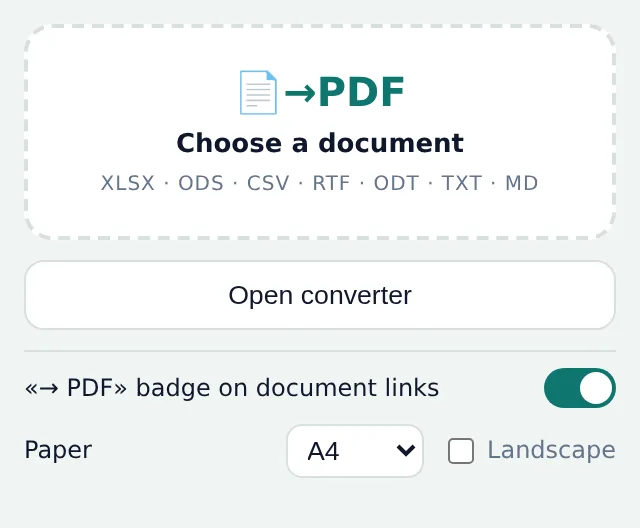
- Choose/drop a file, open the empty converter, recent files, badge on/off, default paper size and orientation.
Implementation notes
- XLSX/ODS/ODT are ZIP containers: read with JSZip (
vendor/jszip.min.js, MIT), sheet/text XML parsed withDOMParser. RTF and CSV parsers are our own, small and local. - Nothing leaves the browser; settings and the recent list are in
chrome.storage.sync, a one-shot file handoff from the popup useschrome.storage.session.
Permissions
storage— settings and recent list.<all_urls>— the → PDF badge on document links and fetching linked files.